Ingest + Tabulate
--workflow ingest_tabulate
Downloads or extracts cell-level metadata from LabKey, a URL, or a local filepath for each sample, and aggregates it into a subject-level summary table. No GPU, no HPC required — the lightest workflow and the best starting point for cohort QC and metadata exploration.
Stage-by-stage dataflow
flowchart TD
    SS["**samplesheet.csv**
    sample_id · output_file_id · url · path · species"]

    DISPATCH{"**Tri-mode dispatch**
    Which column is non-empty?"}
    INGEST_LABKEY["**INGEST_LABKEY**
    (Rdiscvr)
    Downloads Seurat RDS + extracts metadata from LabKey"]
    INGEST_URL["**INGEST_URL**
    (Rdiscvr)
    Downloads Seurat RDS + extracts metadata from URL"]
    INGEST_FILE["**INGEST_FILE**
    (Rdiscvr)
    Loads Seurat RDS + extracts metadata from file"]
    INGEST_META["**INGEST_METADATA**
    (Rdiscvr)
    Downloads cell metadata CSV only (no Seurat RDS)
    LabKey-only module"]

    COLLECT["collect()
    Gathers all metadata CSVs"]

    TABULATE["**TABULATE**
    (Rdiscvr)
    Cell-type proportions → subject-level summary table"]

    OUT_META["outputs/ingest/{sample_id}_metadata.csv
    Cell-level metadata for each sample"]

    OUT_TABLE["outputs/tabulate/subjectIdTable.csv
    Subject × cell-type proportion table"]

    SS --> DISPATCH
    DISPATCH -->|"output_file_id"| INGEST_LABKEY
    DISPATCH -->|"output_file_id"| INGEST_META
    DISPATCH -->|"url"| INGEST_URL
    DISPATCH -->|"path"| INGEST_FILE
    INGEST_LABKEY -->|"tuple(meta, metadata.csv)"| OUT_META
    INGEST_URL -->|"tuple(meta, metadata.csv)"| OUT_META
    INGEST_FILE -->|"tuple(meta, metadata.csv)"| OUT_META
    INGEST_META -->|"tuple(meta, metadata.csv)"| OUT_META
    INGEST_LABKEY -->|"all metadata CSVs"| COLLECT
    INGEST_URL -->|"all metadata CSVs"| COLLECT
    INGEST_FILE -->|"all metadata CSVs"| COLLECT
    INGEST_META -->|"metadata CSV"| COLLECT
    COLLECT -->|"[metadata.csv, ...]"| TABULATE
    TABULATE --> OUT_TABLE
Two parallel ingest paths
When a row uses output_file_id, the workflow fires both INGEST_LABKEY and INGEST_METADATA for that sample. INGEST_METADATA downloads cell-level metadata only (no full Seurat RDS), while INGEST_LABKEY downloads the full RDS and extracts metadata from it — redundant for tabulate alone, but this allows the same workflow to feed a future export or integration step without a separate download. For url and path rows, only the corresponding ingest module runs, since INGEST_METADATA is LabKey-specific.
Inputs
Samplesheet
Path: --input (default data/samplesheet.csv)
Each row must have exactly one of output_file_id, url, or path populated. See Data Formats → Samplesheet for the full column specification.
sample_id,output_file_id,url,path,species
SAMPLE_LABKEY,12345,,,human
SAMPLE_URL,,https://example.org/data.rds,,macaque
SAMPLE_FILE,,,/home/user/data/mydata.h5ad,mouse
Required parameters (LabKey mode)
| Parameter | Description |
|---|---|
--labkey_base_url |
LabKey server base URL |
--labkey_folder |
LabKey folder path |
These parameters are only required for rows that use output_file_id (LabKey mode). Rows using url or path do not need LabKey credentials.
Optional parameters
| Parameter | Default | Description |
|---|---|---|
--tabulate_id_cols |
cDNA_ID,SubjectId,Vaccine,Timepoint,Tissue |
Subject-level ID columns to carry into the summary table |
--tabulate_celltype_cols |
(empty) | Additional cell-type columns beyond the standard RIRA set |
--tabulate_parent_col |
(empty) | Parent lineage gating column (defaults to RIRA_Immune.cellclass) |
--tabulate_celltype_parent_map |
(empty) | Override parent→child hierarchy (e.g. RIRA_TNK_v2.cellclass:TNK) |
--outdir |
outputs/ |
Output directory |
Outputs
INGEST_* → outputs/ingest/{sample_id}_metadata.csv
| File | Description |
|---|---|
{sample_id}_metadata.csv |
Cell-level metadata table for the sample. Each row is one cell (barcode). Columns include barcode, sample_id, species, and all RIRA/custom annotation columns present in the source object. |
Produced by all four ingest modules. INGEST_METADATA downloads the metadata CSV directly from LabKey without pulling the full Seurat RDS. INGEST_LABKEY, INGEST_URL, and INGEST_FILE extract the same metadata from the full Seurat object.
Column name normalization
All ingest modules automatically normalize column name aliases:
cellbarcode → barcode, RIRA_Immune_v2.cellclass → RIRA_Immune.cellclass.
TABULATE → outputs/tabulate/subjectIdTable.csv
Columns depend on --tabulate_id_cols and available RIRA cell-type columns. Structure:
| Column group | Description |
|---|---|
--tabulate_id_cols |
Subject identity columns carried from metadata (e.g. cDNA_ID, SubjectId, Vaccine, Timepoint, Tissue) |
{celltype_col}__{value} |
One column per cell-type category, containing the proportion (0–1) of cells in that category per subject |
The standard RIRA columns automatically included when present:
RIRA_Immune.cellclass(broad lineage: T cell, B cell, Myeloid, …)RIRA_TNK_v2.cellclass(T/NK subtypes, conditioned on immune parent)RIRA_Myeloid_v3.cellclass(myeloid subtypes)
Synthetic example subject table
The docs and smoke tests use seeded metadata to generate a safe subjectTable_TB.csv example. The heatmap below shows the type of wide-format subject summary emitted by TABULATE.
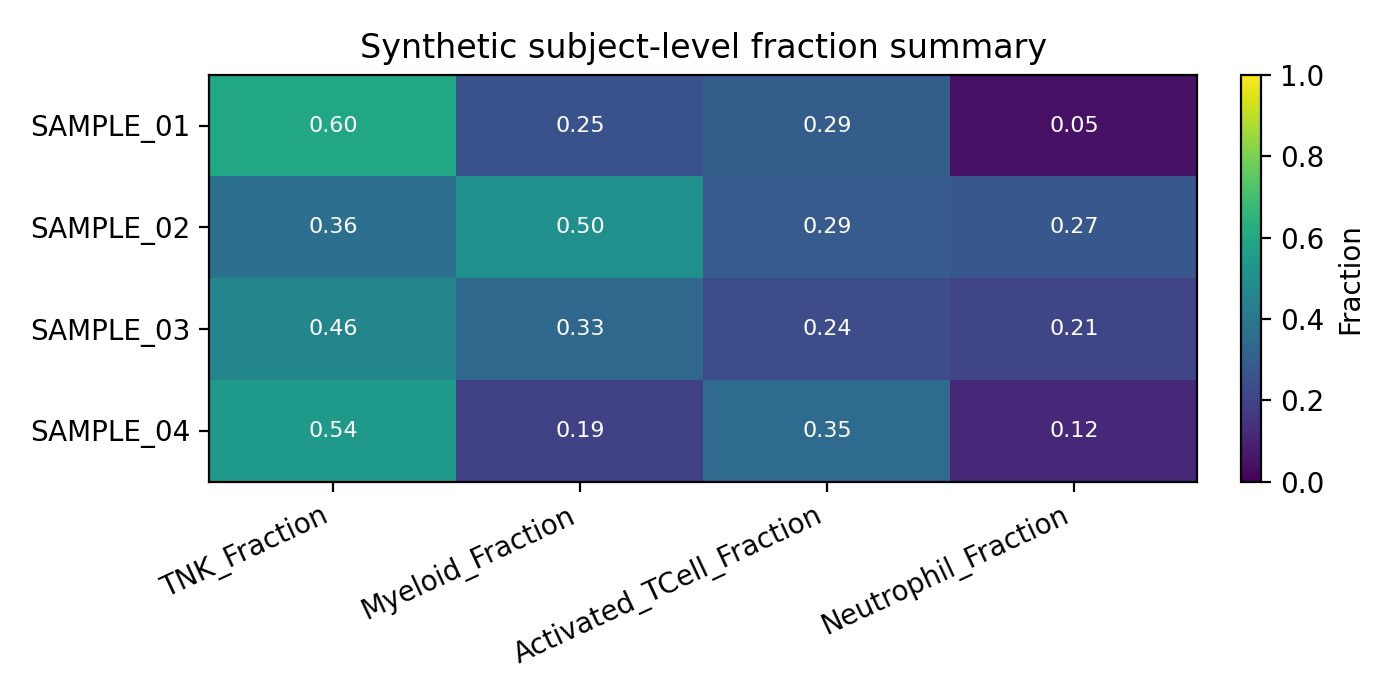
Each row is one subject/sample identity record and each numeric column is a proportion derived from the cell-level metadata.
See the full Synthetic Tabulation Walkthrough and the generated API Reference → Workflows.
Running locally
LabKey mode
nextflow run main.nf \
  --workflow ingest_tabulate \
  --labkey_base_url https://labkey.example.org \
  --labkey_folder /My/Project/Folder
URL mode (no LabKey required)
Local file mode (no LabKey required)
With custom identity and cell-type columns:
nextflow run main.nf \
  --workflow ingest_tabulate \
  --tabulate_id_cols "cDNA_ID,SubjectId,Vaccine,Timepoint,Tissue" \
  --tabulate_celltype_cols "RIRA_TNK_v2.cellclass" \
  --tabulate_parent_col "RIRA_Immune.cellclass" \
  --labkey_base_url https://labkey.example.org \
  --labkey_folder /My/Project/Folder
Running on HPC
For routine SLURM runs, the recommended entrypoint is a copied runs/<name>/run.sh template. The command below shows the repo-root launcher alternative.
bash slurm_nextflow.sh \
  --workflow ingest_tabulate \
  --labkey_base_url https://labkey.example.org \
  --labkey_folder /My/Project/Folder
Container prerequisites: When running on SLURM, Apptainer must be configured before your first run. See Container image pre-pull and SIF cache in the usage guide for graphroot setup, storage details, and all
NXF_APPTAINER_*environment variables.
Resource profile
| Step | CPUs | Memory | Wall time |
|---|---|---|---|
| INGEST_LABKEY / INGEST_URL / INGEST_FILE | 4 | 32 GB | 4 h |
| INGEST_METADATA | 4 | 32 GB | 4 h |
| TABULATE | 4 | 24 GB | 4 h |
Downstream use
The subjectIdTable.csv is designed for direct import into R or Python for cohort-level analysis:
See also example_tabulation_script.rmd in the repository root for a worked example.